
Routing Based on Date & Time Sample
This application demonstrates routing based on business hours. A customer care company separates customer calls based on working days (Monday - Friday) and working hours (09:00 -17:00). Based on the working days and hours, the company sends the customer call to one of two targets.
- Agent Group #1: CustomerServiceTeam - Available during the working days and hours.
- Agent Group #2: AfterHoursTeam - Available for non-regular working days and hours.
Previous Genesys Administrator (or Configuration Manager) setup involved defining Agent Groups and agents (Persons). The workflow diagram is shown below.

The above diagram is keyed to the numbers below.
- The Entry block Variables property includes three user-defined variables. The Today and IsNineToFive variables are used for this application.
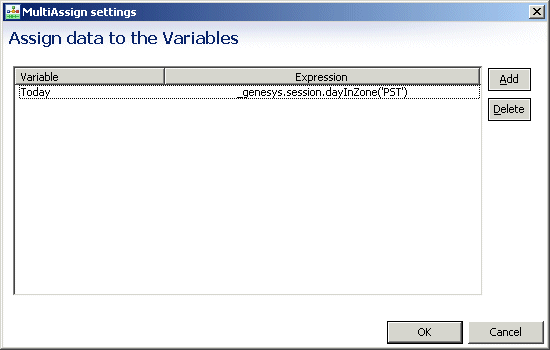
- The Assign block Assign Data property assign a value to the Today variable. The function shown returns the current day of the week in the specified timezone.

- The Branching block Conditions property contains an expression used for segmenting interactions based on the date condition.

You can open Expression Builder from the Condition property of the branching block and access Orchestration Server date/time functions (Data Category=Orchestration Server Functions > Data Subcategory=genesys):
- The ECMAScript block Script property uses standard ECMAScript time objects.
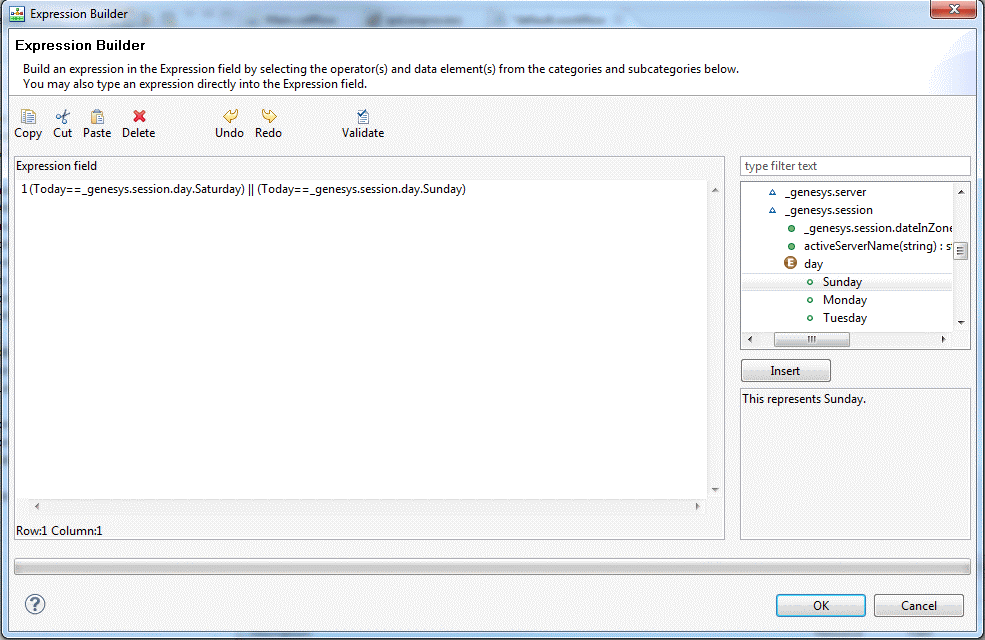

- The Branching block Conditions property contains an expression, which determines whether the interaction goes to the CustomerServiceTeam or the AfterHoursTeam Agent Group.
- The first Target block routes to the CustomerServerTeam.
- The second Target block routes to the AfterHoursTeam.
This page was last edited on July 24, 2013, at 12:43.
Comments or questions about this documentation? Contact us for support!